
My Claude Code + Obsidian setup
I had multiple approaches to build my own, personal AI agent. Agent that would make anything in my life, work or private, easier. I participated 3 editions of an intensive training on AI agents, and after each edition I thought I’m ready to build something, and I hoped to do it after a short break from the AI-topics, but that day has not come.
In the meantime I become a fluent user of AI agents for coding, this winter I shifted from using Cursor to using Claude Code (I’ll call it CC), and that changed everything.
The change
In just a couple of weeks I started using CC for many non coding tasks - it turned out to be a great tool for almost all web-browsing, for example to compare the gear I wanted to buy, to discover, to find cool places to visit during holidays. If I want to find the best places (for me) in country X, I could spend days reading a number of blog posts mentioning usually the same bunch of places, or ask CC to do it for me. Since I plan my trips in Obsidian, created an AI/ directory in my vault, gave CC full Read/Write permissions to files in this directory (and full WebSearch permission), added CLAUDE.md file with some cooler AI agent personality (~australian surfer 🏄), created a file with the list of things I like (or I am interested in) for agent’s reference, and my personalized travel assistant was ready to go! I could talk with CC about the trip, and at the end of each discussion I asked it to add all new information to the trip planning note.
Soon after that I started using it for a scientific research - I needed to do some quick and not too deep research on the role of gene X in some tissues. I added biomcp (which I replaced later with an official PubMed MCP) to the mcp.json, asked questions, and CC found a number of papers on this topic. I asked some further questions, it gave me more papers, after a few rounds I asked it to write everything down into a note in obsidian with exact quotes from the papers supporting particular claims, checked them if they were not hallucinated, and all, or nearly all of what Claude found was true!
I learned that I do not need to build my own personal AI agent - agents are available, and I can easily integrate them into my way of working.
Almost perfect?
Although my CC <-> Obsidian setup was cool, it had two limitations:
- I could not use it on my phone and I had to open my laptop all the time,
- its work was frequently paused by permission requests. I wasn’t brave enough to unleash it in the YOLO mode, I was afraid of the possible prompt injections it can get when surfing in the Internet, and did not want to let it send my files out or infect my device.
The idea on how to solve it came when the internet got filled with people running OpenClaw on their newly bought Mac Mini’s, which reminded me about the Raspberry Pi (4) which I bought long time ago and never actually used it. I decided to give my agent its own device, which I’ll not worry too much about!
Raspberry Pi & podman
I found it, installed fresh Raspberry Pi OS on the card, and started from the installation of podman and podman-compose. Why? If agent makes anything wrong, I wanted to limit the blast radius, be able to kill everything and start with the fresh setup as easily as possible. Then I created first two containers:
obsidian, running obsidian-headless CLI to sync my vault files to Raspberry Piaiboxwith my custom docker image, based onnode:24-slimimage, to which I was going to mount my notes directory. In this container I installed CC and a bunch of tools for agent such as:fzf,ripgrepandtreefor finding files in the vault,pythonandjqfor data processing,curl, agent-browser andchromium-headless-shellfor more advanced web accessghfor easier GitHub accesscronfor running scheduled tasks- a custom telegram MCP, for sending notifications on my mobile
Agent was almost ready, but I started feeling that I will get lost in my own obsidian vault files soon. At this point I wanted CC not only to have access to the selection of my files, but I also wanted to see in obsidian CC’s memory files and drafts it creates when running some of my agent skills, and finally to be able to define through Obsidian new skills and cron jobs. Single AI/ directory was not sufficient anymore.
Obsidian vault reorganized
I created a few new directories and mounted them to different places in the aibox container:
aibox/Agent- mounted to$HOME/.claude/projects/-workspace/memory, where CC writes the memories of agents run in/workspaceCommands- for custom commands, ->/home/node/.claude/commandsSkills- for custom skills, ->/home/node/.claude/skillsCron->/home/node/aibox/Cron- for the future scheduled jobsLogs/- for container logsAGENTS.md->/workspace/AGENTS.mdand sym-linked asCLAUDE.md- my now extended system prompt with agent personality, list of command I want agent to use because they are whitelisted in/workspace/.claude/settings.json, map of the workspace, and so on…
Spaces/AIDrafts->/workspace/Vault/AIDrafts- default place for all files written by agent, added to my vault’s.gitignoreAINotes->/workspace/Vault/AINotes- place for agent notes which I intend to version using gitNotes->/workspace/Vault/Notes- place for my notes which I want to share with agent- and a few other ‘project’ directories , course materials, for e.g. my herbs knowledge base, which I want the agent to have access to
As you can see all directories are mounted to one of the two places: $HOME, or /workspace. The reason for that is because agent will have an unlimited access to files in its working directory. I want agent to have full access to its workspace, but to have all the configuration files out of range - for this reason all config files, skills, cron jobs go to $HOME, and all notes went to workspace.
The way it works
That’s almost it! Here’s how I use my AI agent now:
- I have one central point to use the agent. Whenever I want to use my agent, I run
ssh pito log into the Raspberry, and typecc, which is my alias that runsclaudein/workspace. I can ssh into Pi device from any device, even from my mobile, using tailscale VPN. If I want to use agent from my mobile, I start session on Pi, type/remote-control, and continue the conversation on my mobile Claude app - the agent still can use all skills, MCP servers, and CLI tools installed inaibox - I get less permission requests. In the
.claude/settings.jsonI whitelisted most of the not-very-dangerous commands - Write, Read, Edit, WebSearch, WebFetch, Bash with many safe patterns including running python scripts in an additional sandbox. I chat with the agent that rarely needs my permission to run its action. It can read relevant files about me and my projects, and it writes to these files whenever I want. It can query data usingcurland process it using sandboxed python, with limited number of python packages which I installed in env. If something bad happens, I can kill the container and start again. - Notes. Agent has access only to the subset of my notes which I intentionally mount to the
aiboxcontainer. All notes are synchronized between Raspberry, my laptop and my mobile. I can chat with agent on mobile app, and browse results in mobile obsidian app. My vault is versioned usinggiton my laptop, where I can verify any changes introdyced by agent, and snapshot it. I do not track changes in theAIDraftsdirectory, wihich is for AI drafts.
Skills and CLIs
It’s really extensible now! I create a lot of skills and CLIs. When I find a service that has API and I want my agent to have access to, I ask Claude for a simple CLI in python. Most APIs return big JSON outputs which can quickly eat your context window, and you often need to make many calls to gather all information that’s needed. In my CLIs I usually accept list-inputs, so that a single agent query can launch all required API calls, and return precisely filtered output to agent as plain text. Then I ask CC to write new skill, instructing it when and how to use the new CLI. My custom CLIs/skills include for e.g checking the aurora forecast, searching flights and accommodation, summarizing long articles and podcasts or getting the list of the events in my city that I might find interesting. My CLI commands are in the allow-list, so agent can run them without asking me for permission, and because I my mobile app also uses the sessions running on Pi - I can use them from anywhere!
Extras
Now the final feature. Do you remember my aibox/Cron directory? Cron is a UNIX program that allows to execute any bash command or script according to the schedule. I built-in a single cron job script into the docker image, a python script called heartbeat.py, which executes every minute and checks the checksums of all files in /home/node/aibox/Cron. My files in this directory have a special YAML frontmatter:
schedule: <execution schedule in cron format>
enabled: <bool>
runner: 'shell|claude -p'
description: <str>
allowedTools: <list of tools that claude is allowed to use if it is the selected runner>
---

<script or prompt>
If heartbeat.py detects change, it uses these fields to generate crontab: for each enabled file it adds a command which either executes the note as bash script, or passes it to claude as a prompt, according to the schedule.
Using Obsidian bases, I can now turn jobs on and off and update their schedules from a single view in Obsidian. What do I use it for? For e.g. to monitor the aurora forecast and to send me the notification if the forecast’s promising, or to check and summarize the RSS feed from websites, or to update weather forecast in planning note of my next holidays - usually using the skills and CLIs created just a moment ago. I use it to automate simple tasks that I rarely remember about, and to provide the summary information exactly to the place (note), where I will need it.
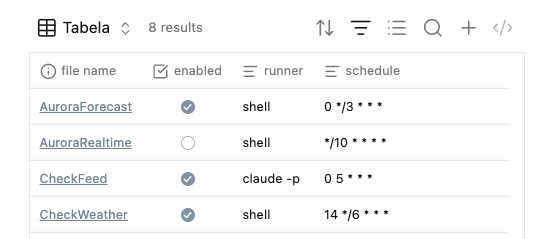
It seems that Obsidian became my Operating System now ;)
That’s it. If you read it to this point, I really hope that you found something interesting for you ;)